Microsoft Clarity now has a free feature called Citations. It shows you when AI systems like Copilot use your website as a source for their answers.
Here is what it is, how to turn it on, and how to use the data.
What it does
When AI generates an answer, it first pulls content from the web. This is called grounding. If your page gets used, that is a citation.
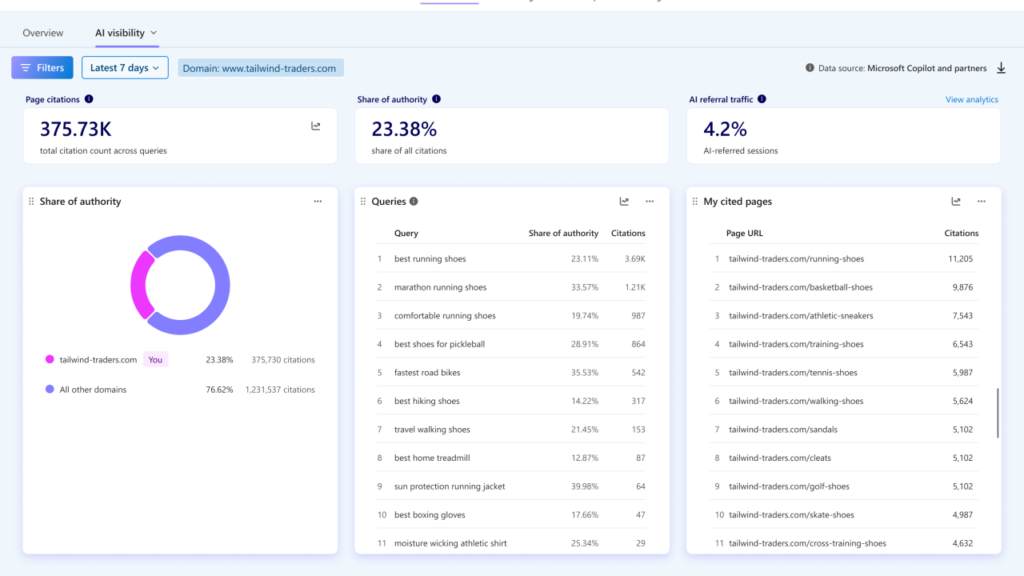
The Citations dashboard shows you:
- Which of your pages got cited
- What query the AI was answering when it cited you
- How much of the answer your content actually supported
- Whether those citations led to any traffic
Note: this only tracks Microsoft’s AI surfaces (Copilot, Bing). It does not track ChatGPT, Gemini, or Perplexity directly.
How to turn it on
- Create a free Clarity project at clarity.microsoft.com
- Install the Clarity tracking script on your site
- Verify your domain by connecting Bing Webmaster Tools or Google Search Console inside your Clarity project
- Wait for data to populate; this happens automatically
- Go to Dashboards, then AI Visibility, then Citations

That’s it. No CDN setup, no extra tools required.
What to look at
- Cited pages: Which URLs got picked up and how often.
- Grounding queries: The actual queries AI used to find your content. This is the most useful part of the whole dashboard.
- Share of authority: How much of the AI’s answer came from you versus other sources it cited.
- AI-referred traffic: Whether citations are turning into actual visits to your site.
How to use this data
- Check your top cited pages. See what they have in common (clear structure, direct answers, easy-to-lift content). Apply that pattern to other pages.
- Go through the grounding queries list. If AI is grounding on topics you have no page for, that is your next content brief.
- Check it monthly, not once. There are trendlines built in, so you can see if your changes are actually working.
The limitation
This is not full AI search tracking across every platform. Paid tools like Profound or Scrunch cover ChatGPT and Perplexity too. But this is free, first-party data, with no traffic limit, and a good starting point if you are not ready to pay for a dedicated tool yet.
If you run SEO for any brand, this is worth turning on this week.